
SolarEdge Battery Settings Explained: Backup Reserve, Modes and Weather Guard
SolarEdge battery settings come down to four things: the battery mode (how and when the battery charges and discharges), the backup reserve (how much it holds back for outages), Weather Guard (keeping the battery charged to prepare for a storm), and export limits (set by your installer for the utility). Get the mode and reserve right for your rate plan and you'll use more of your own solar. Get them wrong and the battery can sit full while you buy power from the grid.
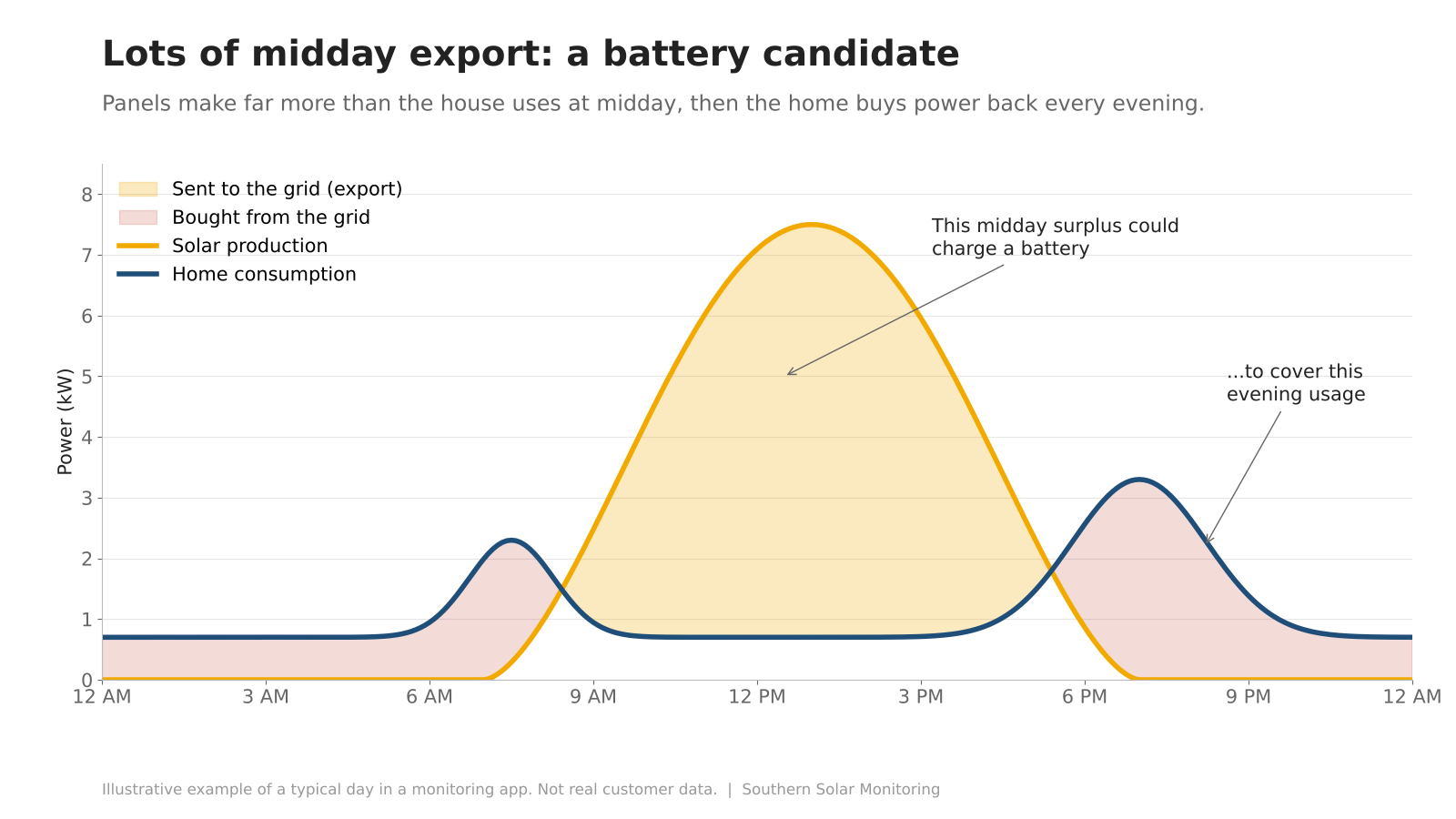
Example only, not customer data: midday solar going to the grid while the house pulls from the grid at night.
The SolarEdge Battery Modes
Which modes you see depends on your region and equipment.
| Mode | What it does | Best for |
|---|---|---|
| Maximize Self Consumption | Solar powers the house, then charges the battery | Flat-rate plans |
| Time of Use | Charges off-peak, discharges at peak | TOU rate plans |
| Backup Only | Keeps the battery full for outages | Outage-prone areas |
| Manual Control | You set charge/discharge times | Advanced users |
Backup Only needs a backup-capable setup (SolarEdge Home Battery with a Backup Interface). If your utility doesn't charge more at certain hours, Maximize Self Consumption is usually the simple choice. If it does, Time of Use can maximize your savings by storing energy for the expensive hours.
To change the mode in mySolarEdge: tap the battery icon, tap Battery Mode, and pick a mode. For Time of Use, you then enter your utility's peak hours. SolarEdge notes Time of Use is still rolling out to select owners, so it may not show up for you yet.
Backup Reserve: How Much to Hold Back
The backup reserve is the percentage the battery won't go below in normal use, so it's there when the grid goes down. In mySolarEdge, owners with a battery and backup interface can view and change it. It's set as an average for the whole site, not per battery.
To change it: tap the battery icon at the bottom of the app, open the battery settings, and drag the reserve slider. It can only go below 100% when the battery is in Maximize Self Consumption mode.
Higher reserve means more outage protection but less daily use. There's no single right number; it depends on how often your power goes out and what you need to keep running.
Weather Guard for Storms
When Weather Guard detects severe weather, it raises your backup reserve to 100% and tries to charge the battery full before the grid goes down. Afterward, the reserve goes back to your normal setting.
SolarEdge says it works with SolarEdge Home Battery and LG Chem batteries. To turn it on: open mySolarEdge, go to Storage, and switch Weather Guard to ON. If you live where storms knock out power, leave it on.
Export Limits: The Setting You Don't Touch
Some utilities cap how much power a system can send to the grid. SolarEdge handles this with export limitation, which uses a meter at the grid connection and reduces solar production to stay under the limit.
This is set by your installer to match your interconnection agreement. Don't try to change it; that's between your installer and the utility. If you're orphaned and think the limit is wrong, we can check it against your approved paperwork.
Can't Change Your Settings? Check Who Controls the Site
SolarEdge says you must be the Site Owner to set the battery mode. Your installer grants that, and if you revert to installer settings in the app, control goes back to the installer's account. When the installer is out of business, that's a real problem. A certified SolarEdge installer can help sort out access.
Know What Your System Is Doing
A setting is only as good as what the battery actually does.
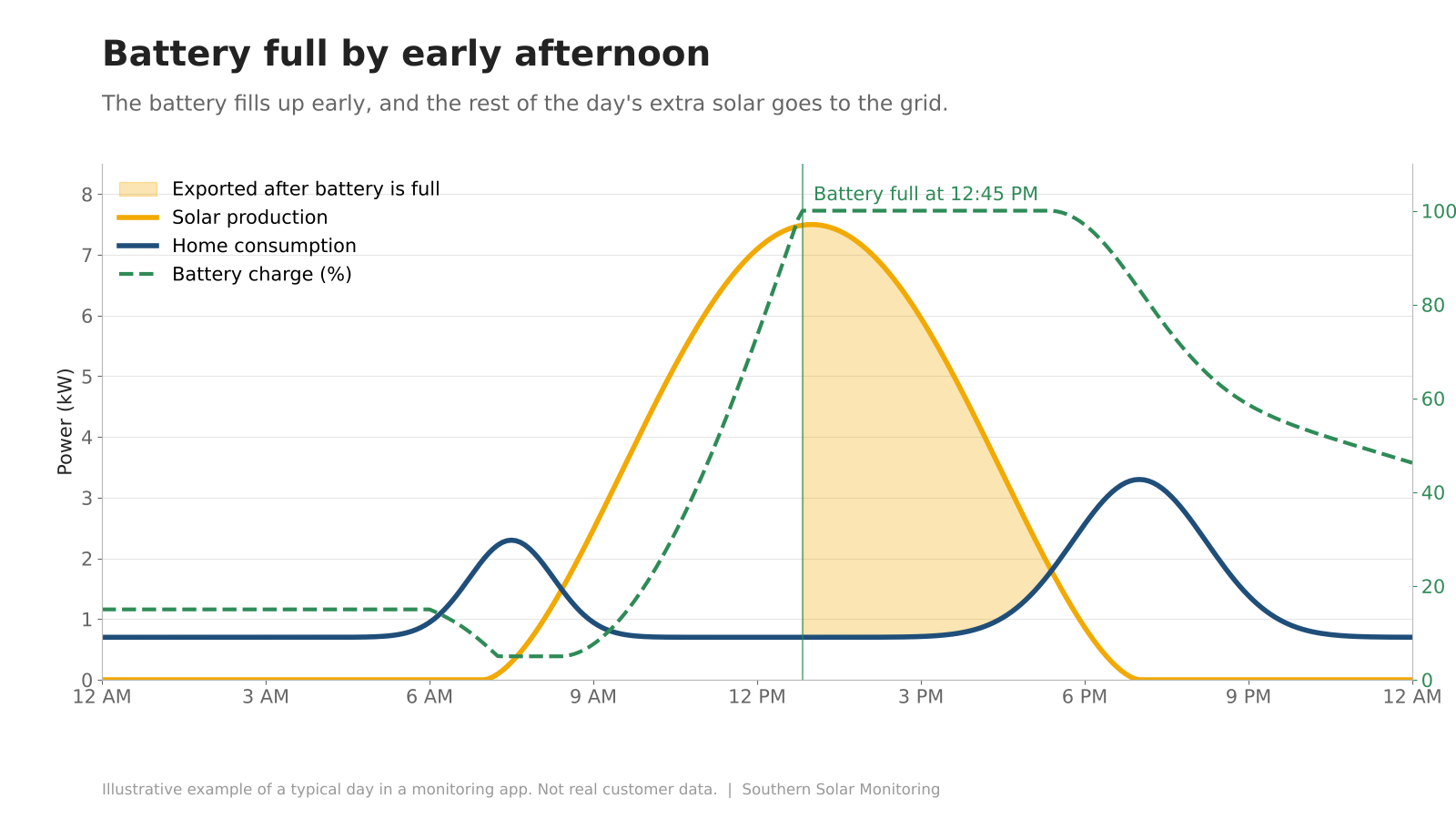
Example only, not customer data: the battery is full by about 12:45 PM, and every bit of solar after that goes to the grid.
If your data looks like this every sunny day, the battery is small for how much solar you make, and a second battery may be worth a look. Monitoring also catches a battery that isn't charging, isn't holding its reserve, or stops reporting. Southern Solar Monitoring watches your production and battery data daily and tells you when something's off. Basic monitoring is free. Call (706) 204-9115 or sign up for free monitoring.
FAQ
What is the best SolarEdge battery setting? For flat-rate plans, Maximize Self Consumption is usually the simplest. For time-of-use plans, Time of Use mode shifts stored solar into peak hours.
Why can't I change my SolarEdge battery mode? You need Site Owner permission on the account. If your installer still controls the site, they or another certified installer will need to grant it.
Does SolarEdge have a storm mode? Yes. Weather Guard in the mySolarEdge app charges the battery to full and raises the reserve to 100% when severe weather is detected.
Sources: SolarEdge Battery Mode Control Application Note · SolarEdge Weather Guard · SolarEdge Time of Use mode · SolarEdge Energy Hub Battery Settings Guide · mySolarEdge · SolarEdge Feed-in Limitation Application Note